Launch of beneschtech.com site!

 The website is up!   Finally after many, many years, I finally have a decent website. Electronics and futurism reading, and some minor sale...

Sunday, August 2, 2026

Launch of beneschtech.com site!

 The website is up!


Finally after many, many years, I finally have a decent website. Electronics and futurism reading, and some minor sales of electronic devices, and some stuff related to mycology, my new hobby since Prop 122 passed in Colorado. Lets see how this goes :)

Friday, June 12, 2020

Disassembling C++ Part 2 -- Objects

What is an object?


This article is part two of my Disassembling C++ series.  The first one was here about overloaded functions, and mangling.  Some of what we are going to discuss is built on that.  An object programmatically is basically a collection of data and functions that serve a similar purpose.  For example, you can have a bicycle object that you can call a function to rotate the wheels, and get the wheel count (2) from a variable or an accessor function.  There are entire books written on object inheritance, polymorphism, reflection, and other nuances of the object oriented methodology and I really don't want to rehash all of that in a five to ten minute article.  I assume that if you are here reading this, you know what an object is and all of the fun things you can do with them. I’m going to make a bold statement about objects in general from the compilers perspective though: Classes are just fancy structs.  In fact, starting with C++11 you can have a struct with functions. The only difference is that structs have everything by default public whereas a class is by default private. We are going to do some more C/C++ namespace hacking in this article too, so if you enjoyed that in the last one, more is coming.

Objects only hold data


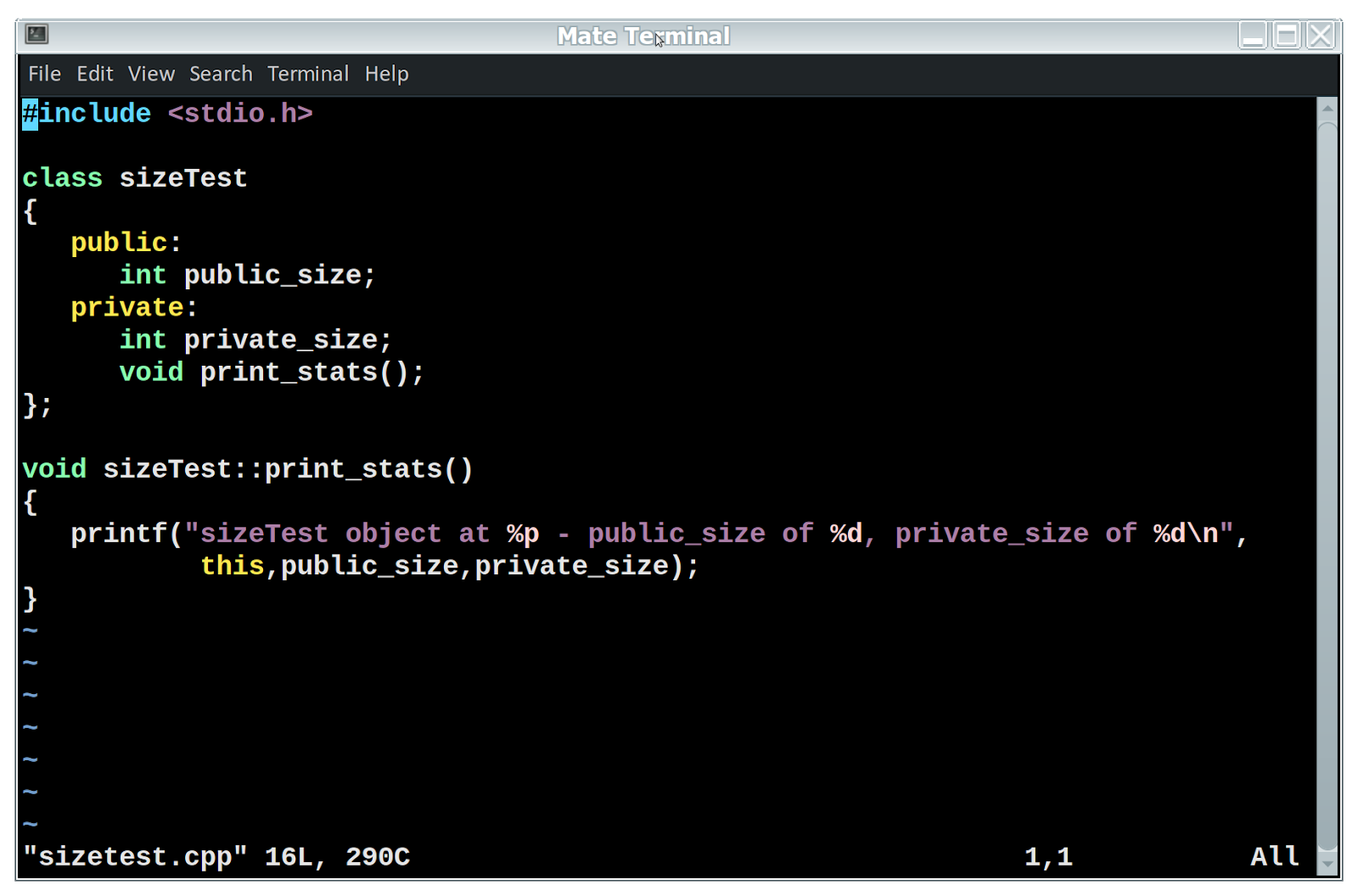
I know that most of us are used to the idea of a class (or object) as being a mysterious collection of data and functions that we can create, copy, destroy, extend, or use in a polymorphic fashion.  The truth is that the functions inside a class are just regular functions mangled by the compiler, and the class is only a pointer to the data inside of it. Let’s take this simple object here:


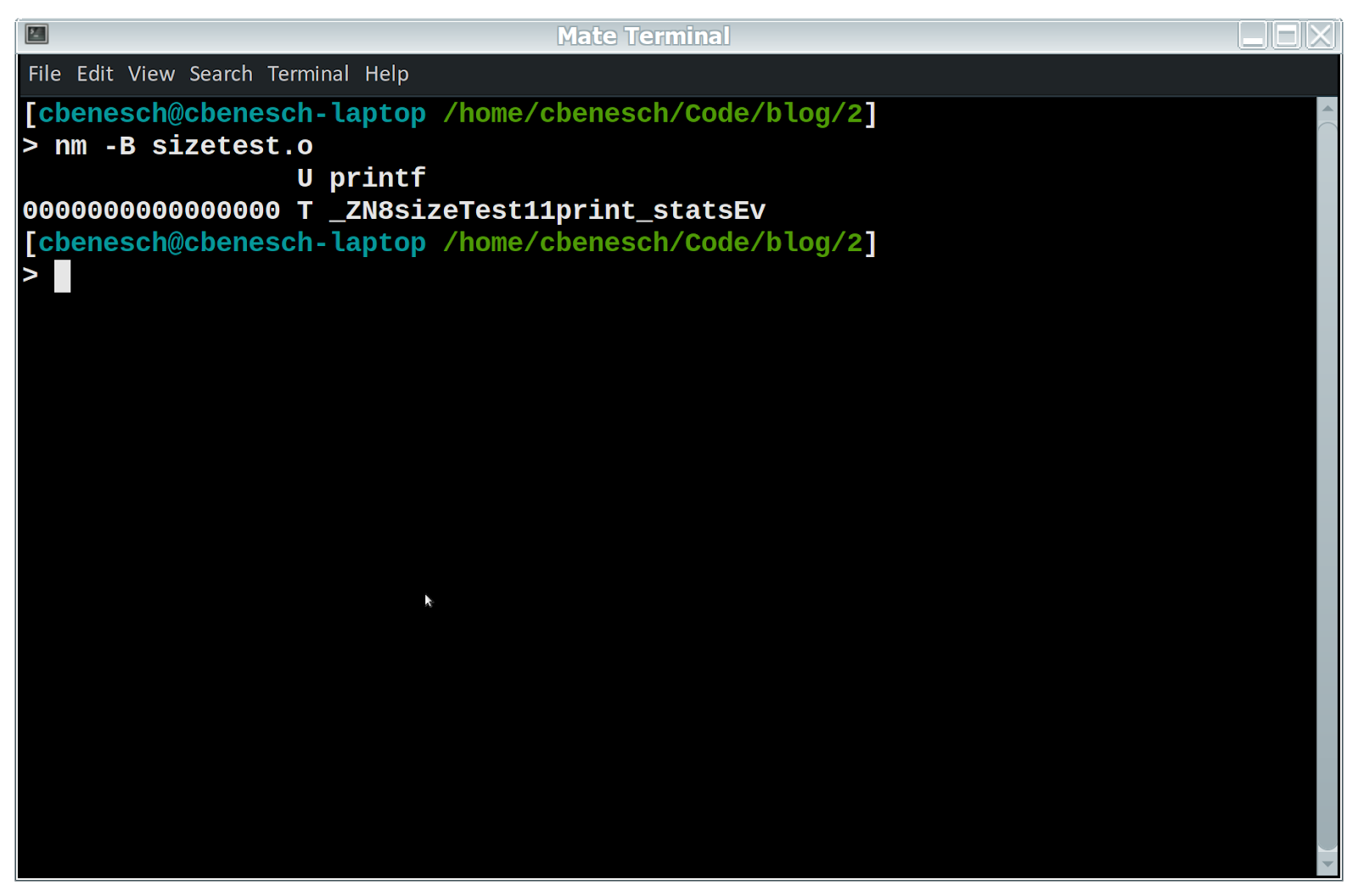
Now, if we compile this and look at the symbols exported, we see the function and a reference to printf in C linkage.

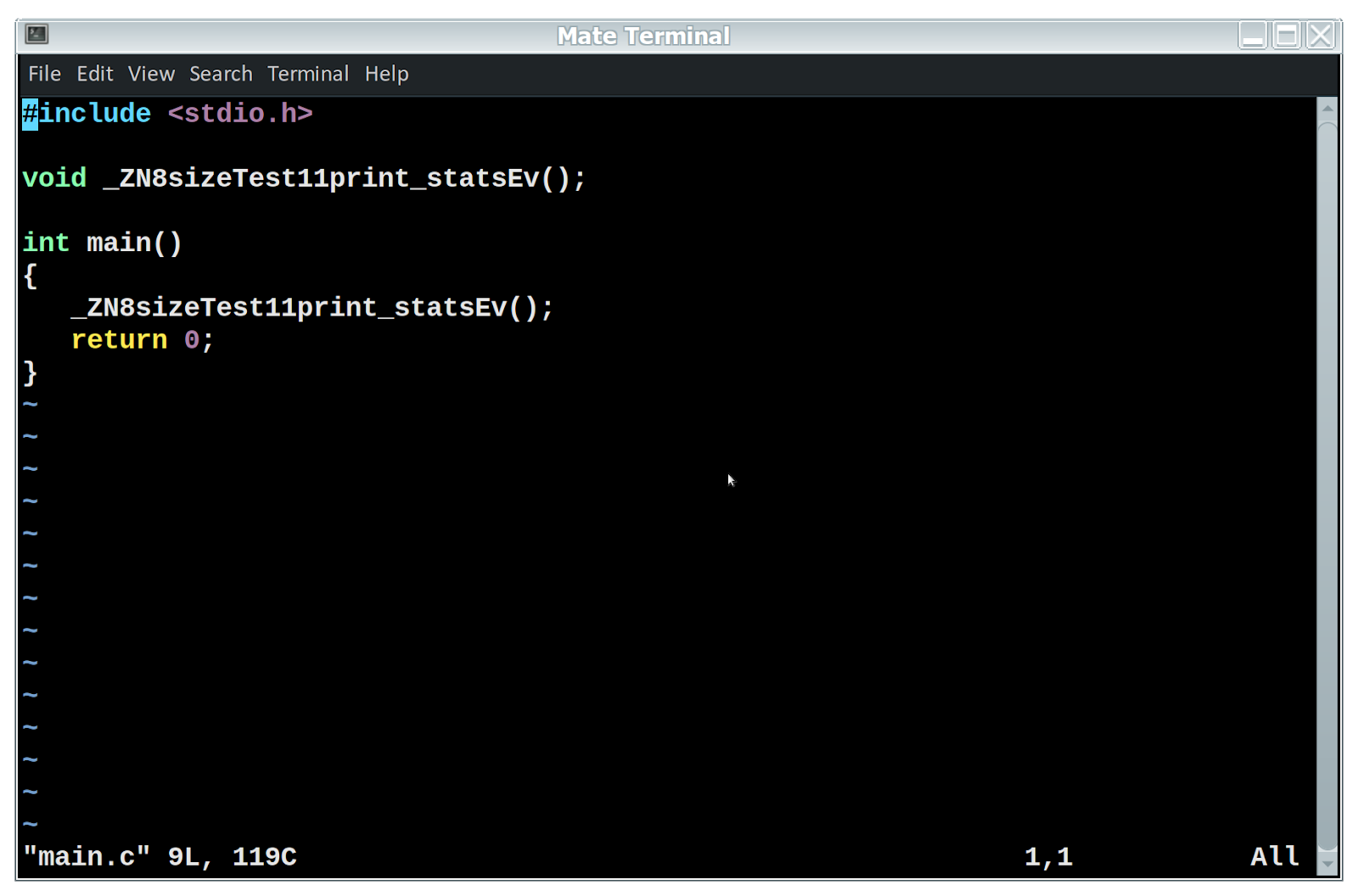
Notice that the function, even though private is still defined in the file.  That is all that it is, a function, and as such can be called from regular old C.  So, would this work?

Let's find out:

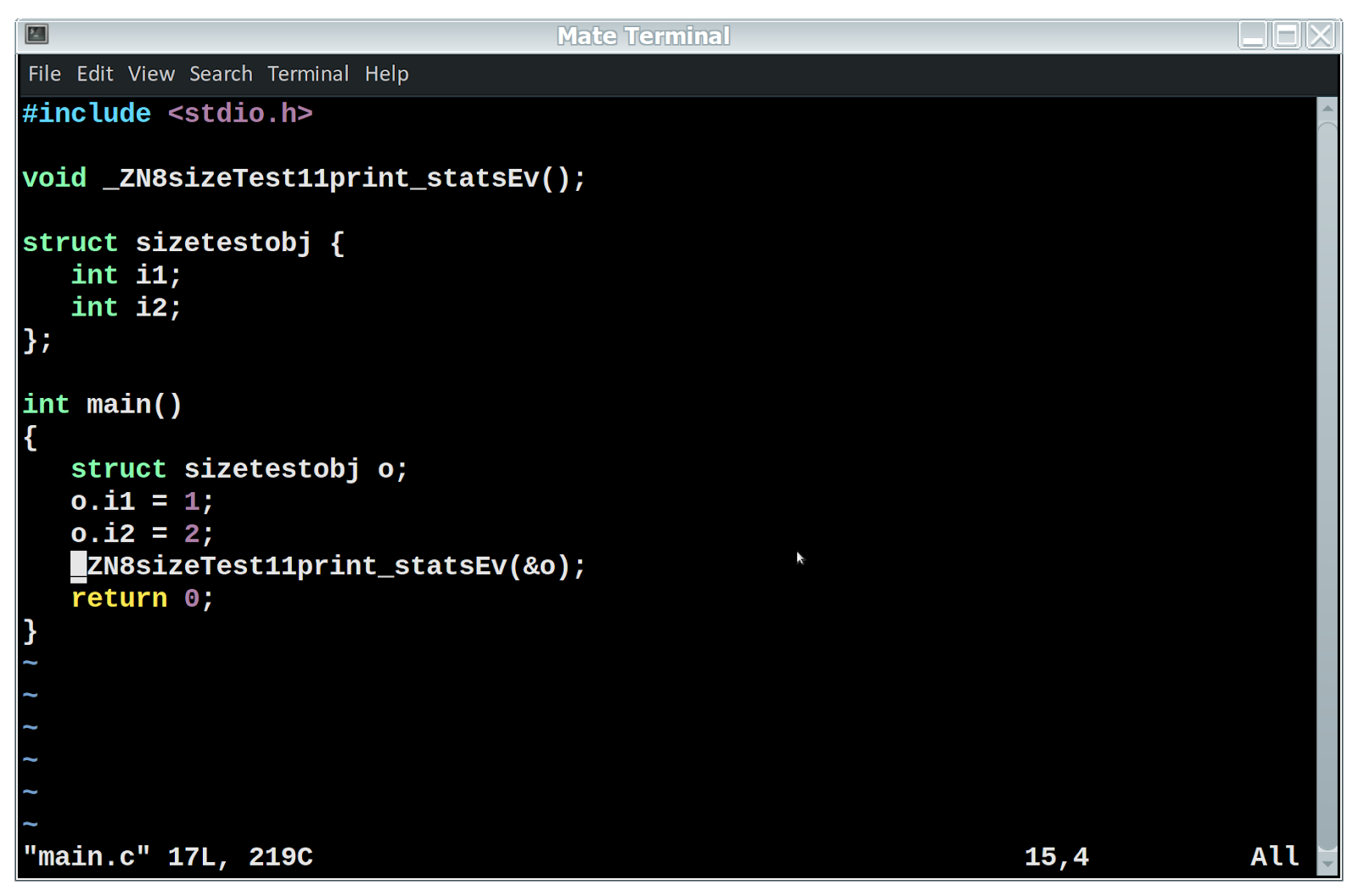
Kablammo!  But there is a very good reason for that.  Remember how I said an object is just a pointer to some data?  One thing the compiler does under the hood is for every object function call, there is a hidden first parameter that is the object's address to represent “this”.  Now our example object here has two ints as it data elements. So let's try an experiment.


Here since we know what the object’s data looks like, we create a C struct that is identical.  We also pass the address of the struct as the sole parameter to a function declared inside of an object to have none.

This really works!  Try it yourself. Also notice that I never linked against the libstdc++ library, it’s all just the standard C library using gcc.  From C, we were able to create a faux object, and call a real objects functions against it. Also, remember the definition of our function here?  Its private. All of that stuff is just for us, as people to help organize data. We could also create an inherited class from this one and it would still work, that is a compiler feature too.

Next up, language features we take for granted that are part of the c++ library itself.  These cool hacks which show how data is organized work best on simple objects. When you get into more complex situations, things get bigger and more complicated.  However, it all boils down to the simple things. You are calling a function with a hidden first parameter as a pointer to the objects “this” parameter for regular functions, and for static functions, you are literally just calling a function.  The rest of object oriented methodology is simply determining what function to call and the appropriate address to pass to it.  The bottom line, your class can be as complex as you want, but it will still only use up as much data as you have defined.  A class with two ints in it will use up 8 bytes of memory whether it has 2 functions or 200.

Saturday, March 21, 2020

Mac N Cheese Chicken Casserole

As we all hunker down to let the Corona Virus passover us (spelling intentional), a lot of us are used to eating out, ordering pickup food, or otherwise and find our culinary skills are lacking.  I figured I would share some very simple, but nutritious recipes when we want to eat in.

Supplies needed:

1 Box Kraft (or other brand) Mac N Cheese mix
2 Large cans of canned chicken (10 oz per can)
1/4 cup of butter (1/2 full stick)
1/4 cup of shredded sharp cheddar cheese (optional, or about 1 good sized handful out of a bag)
1 Can opener
1 metal fork (for stirring)
2 Microwave safe bowls, glass or hard plastic (tupperware wont do)
2 sheets of full size paper towels connected

Now I know the serving size on these makes it seem like you could feed a party out of it, but I'm a big boy and most people are too, so its basically 2-3 people.

Est Time to prepare - 10 minutes

Open chicken cans one at a time, by puncturing then on opposite sides of the can with the can opener and then drain water into the sink.  If you have cats they will come running probably.  Once drained open the rest of the way up.

Dump both cans of chicken into microwave safe bowl #1, and wrap in paper towels (it will pop and try to blow out all over your microwave, this stops that and keeps the moisture in)

Microwave for approx 2 minutes.  Retain paper towels and set cooked chicken aside.

Pour noodles from Mac N Cheese box into bowl #2, and cover noodles with water plus about 3/8 inch.  Stir pretty well until water is cloudy.

Microwave for 2:30 with paper towels saved from before underneath bowl.  (it very likely will boil over and the towels will help avoid making your microwave wet)

Stir noodles again

Microwave an additional 2 - 3 minutes until boiling water subsides under rim of bowl.

While noodles are being heated, take your 1/4 cup of butter and chop into pieces about 1/2 inch wide.

Add cheese powder packet, chicken from earlier, chopped up butter and cheese into noodles and stir.  Stir until butter pieces are completely melted and everything is an even yellow color.  Dont worry about the little amount of water in the bowl, it will harden with the noodle coating and cheese poweder into a snot like consistency.  Dont stir too hard or else the chicken pieces will fragment into little tiny pieces, you want to be semi gentle to get the large chicken pieces still preserved.

You can also add spices such as pepper, or jalapeno slices.  You can also give the cheese a nice mix with parmesan, or if you like it extra "stringy" a slice or two of meunster.  There are a lot of add ons to make this better to suit your taste, but here are some things to avoid (tried and ewwwwwed):

Garlic
Seafood (shrimp, lobster, crab, etc..) instead of chicken
Excessive salt, the butter has some, and so does the cheese powder
Carrots
Cauliflower

Thursday, November 28, 2019

Disassembling C++ - Part 1 (Intro, overloads)

  Disassembling C++

Introduction


In this next series of articles, I will delve into the inner workings of the C++ and how it accomplishes its object oriented behavior.  It was after all, one of the first object oriented languages, and is one of the most evolved.  It was first released in 1985, but was actually designed in 1979 by Bjarne Stroustrup as a next generation of the popular C programming language developed by Bell Labs.  But enough history, you can look it up yourself on wikipedia or go to Bjarne's home page at http://www.stroustrup.com .  The purpose of this isnt to show you how to program in C++, but more how it works.  This is targeted for old timers like me who have used C most of their career and have gone kicking and screaming into object oriented land, or just the intellectually curious. The first thing is that C++ is C under the hood.  Its dressed up nicely and does some fancy object oriented tricks, but when it starts generating machine code, its more or less C.


Compile time or run time behavior


One of the biggest advantages to knowing how all of this works under the hood is that you can implement more compile time features and less run time ones.  If accessing an object takes a standard library to sort through a list of strings, it will be much slower than just taking a pointer the compiler passed in. It is not all compile time magic, some of it is handled in the low level libstdc++ library.  I like everyone else always assumed it was all just compiler tricks and never thought about it.  Then one day came as a hobbyist OS developer that I wanted to explore the APCI tables, and C++ looked like an obvious choice.  Thats where I not only learned how a lot of this works under the hood, but developed an appreciation for the tight integration of the library and compiler.


Overloads


One very useful feature is overloading.  You can use the same function name with different parameters.  For example:
int add(int n1,int n2)
double add(double n1,double n2)
In fact, you may have been bitten by it during compile time, especially with math functions.  The way that it accomplishes it is through a process called mangling.  The function is renamed according to its parameters and is the one used instead.  In the example two functions above those are two distinct functions.  This is a compile time feature and will have no effect on run speed, so overload away.  Lets show an example, take the following simple program:


To ensure that the correct function gets called, it translates return_value to two different function names based on the parameters.


Now wait a minute, why is main() named exactly like it is named? That is because it was declared as having "C" linkage.  To define a function as having C linkage, you just surround it with extern "C".  For example:


Notice that I declared the function extern "C" in its definition and not in the code of the function itself.  That way the compiler knows this function needs to be in the regular C namespace.  And consequently:


Mixed C and C++ namespaces can cause a lot of headaches.  nm is a wonderful tool to show you exactly what is going on in there.  To de-mangle the names, use the tool c++filt, or sometimes called cxxfilt on older systems.


c++filt can take text either through standard input as shown above, or as a command line argument.  The man page can explain it all.  Notice how the return values are not shown?  That is because you can only overload a function based on the parameters  and not the return value, evn though the mangled name includes the return value.
Remember how earlier I said that its all C under the hood?  Consider the following two files:


Notice we defined the external C++ function under its mangled name to be called from main inside the C namespace.  And sure enough:


You can call C++ code from within a purely C context if you know the overloaded function name.  Obviously there are much better ways to do this, but for our purposes it illustrates an important point.  Although you can think semantically that a function just operates two different ways, you are in fact calling two completely different and distinct functions.  This concept applies to classes too.  More to come in succeeding articles, we have barely scratched the surface.

Monday, May 28, 2018

Tips For Creating C++ Classes

When creating new C++ classes, especially as a beginning programmer, you can end up with a mess that is barely more than a bunch of functions that you have to qualify with a class name. Before designing and writing a new class, keep the following ideals with OOP in mind.

  1.  This new class should be able to be used by any other program.  It should serve a useful purpose that someone besides yourself should find useful.
  2.  If your new class is going to be nothing but functions and hold very little or no data, consider a namespace instead.
  3. If your new class has more than two static functions, consider moving them into a namespace as well.
  4. If your application has more than two singleton objects, consolidate if possible.

Now when starting to code, start from the ground up.
  1. Start with the data.  The variables that this class will hold.  All of them *should* be private, unless there is a good reason not to for one or two.  Unless there is a reason, do not use unsigned variables.  -1 is awfully handy to indicate an error condition.
  2. Constructors... How will people most commonly use your class?  How can you make it as convenient as possible either inside your own application or someone else using it.
  3. Declare the functions you want public to do things with the data other than get/set it.
  4. Inside the header file write a set of generic get/set functions to access every member of data earlier declared private.  The reasons are varied and complex, but trust me in the long run its worth it.  Make them all quick little one line functions unless you need locking or something more complex.  This frees up your source file for the meat of the class's logic.
  5. And finally, the complex or working parts of the class, write in the source file.

Sunday, January 21, 2018

Multithreaded SOAP server using QT and C++

In todays world, one of the common things is to be able to serve SOAP requests.  As an enterprise grows, the need for fast response times and optimizations at every possible place becomes more and more important.  I wrote a generalized SOAP server in C++ using QT Creator and gsoap that connects to a database and runs in multiple threads with prepared statements.  Its a little involved of a process, but I hope the ideas here can help others with similar problems.

Environment: QT Creator, Postgres 9.4, gsoap 2.8 on Ubuntu.  Very little if any is OS specific, other than that its made for *nix.  So, FreeBSD and the like should work just fine too.

By the end of this, you will have a SOAP server that connects to a database, that uses multiple threads which are already started and connected to the database, prepared cursors, and an easy path forward to develop new services on it.  We will also add the ability to retrieve the WSDL from the service by accessing it via http://service/?wsdl . Otherwise known as a GET handler.

Step 1: Create the project in QT

In QT Creator, create a new project, QT Console application.  For this example, we will use gsoap to create C++ classes which are generated from a .h file.  It should place the generated files in a subdirectory named soap.  First off lets create the soap definition file.  In this example, soapDef.h, which will be running in the "beer" namespace and named "beersoap".  Yup, its for a brewing website backend.  Make sure you have network, core, and sql included and add LIBS += -lgsoap++


//gsoap beer service name: beersoap
//gsoap beer service port: http://localhost:7575/
//gsoap beer service namespace: urn:beersoap

/**
 * Simple ping operation to verify operation
 */
int beer__ping(void *,char *&pong);

/**
 * Count user records, used mainly for testing DB connection
 */
int beer__usercount(void *_,int &numUsers);

Secondly, to support WSDL retrieval, we can convert the wsdl file generated by gsoap into a C++ file with the text as a variable which we can reference by an extern.  A little shell script magic will do that for us with the following file: wsdl2cpp.sh

#!/bin/sh

wsdlfile=${1}
cppfile=${2}

echo "const char *wsdlTxt = " > ${cppfile}
cat ${wsdlfile} | sed -e 's:":\\":g' \
                      -e 's:^:":' \
                      -e 's:$:\\n":' >> ${cppfile}
echo ";" >> ${cppfile}


And finally tie it all together inside your .pro file


GSOAPFLAGS=-S -L -c++11 -x -i -d $${_PRO_FILE_PWD_}/soap

gsoap.depends = $${_PRO_FILE_PWD_}/soapDef.h
gsoap.target = $${_PRO_FILE_PWD_}/soap/soapC.cpp
gsoap.commands = \
    soapcpp2 $${GSOAPFLAGS} $${_PRO_FILE_PWD_}/soapDef.h && \
    $${_PRO_FILE_PWD_}/wsdl2cpp.sh \
       $${_PRO_FILE_PWD_}/soap/beersoap.wsdl \
       $${_PRO_FILE_PWD_}/wsdl.cpp
QMAKE_EXTRA_TARGETS += gsoap
PRE_TARGETDEPS += $${_PRO_FILE_PWD_}/soap/soapC.cpp

Now, when we build, including the file wsdl.cpp will create a const char * named wsdlTxt that has the entire WSDL file in it.  In our case with the GSOAPFLAGS we say server side code only, no library generation, use c++11, no xml files, create a C++ class for our methods, and the output directory is source/soap.

Step 2: Create Database

The next step is to create a database to test this out with.  Create a users table, we are just going to have a method to count the records in there.  And another table called prepstmts.  Two fields, a char(32) or similar and a text fields.  Once it connects, we will use it to create a collection of prepared statements.  By far the longest running database operation is connecting and preparing a statement.  We want to offload that to start up routines instead of during processing.  Next, create a configuration file for the program to use.  We will specify the location using QT's command line option parser framework.


# Beersoap config file

dbhost = localhost
dbuser = beergineer
dbpass = 
dbname = beergineer
tcplisten = 7575
threadpool = 5

Ok.. now we have a config file, our makefile will handle the gsoap stuff for us automatically (remember to include all the .cpp and .h files it creates into your project, including wsdl.cpp), now lets do some coding and show how easy QT makes a lot of the mundane C++ tasks, and how relatively simple something as advanced as a thread pool can be written and managed.

Step 3: main.cpp

This is the application entry point.  As any good programmer will tell you, your main function should do initialization, basic sanity checks, then launch the real application.  QT makes things like parsing command line options in a nice, standard Unix like way really easy, especially with C++11.  Here is my main.cpp file:

#include <QCoreApplication>
#include <iostream>
#include <QCommandLineParser>

#include "Config.h"
#include "Server.h"

int main(int argc, char *argv[])
{
   QCoreApplication a(argc, argv);
   QCoreApplication::setApplicationName("beersoapd");
   QCoreApplication::setApplicationVersion("DEV");

   QCommandLineParser parser;
   parser.setApplicationDescription("Beergineer Soap Server");
   parser.addHelpOption();
   parser.addVersionOption();

   parser.addOptions({
      {{"c","configFile"},"Config File Location","configFile"}
   });
   parser.process(a);

   Config *myConfig = new Config(parser.value(configFile));
   if (!myConfig->isValid()) {
      std::cerr << "Config invalid" << std::endl;
      return 1;
   }
   new Server(&a,myConfig);

   return a.exec();
}


Dont worry about the Config and Server objects yet, we will create those in a minute.  What this does, is calling it with a -h option shows the help, -v shows the version, and the config file we created earlier can be specified with either -c or --configFile.  The output is formatted well and all the nastiness of getopt and the old school way is handled for you.  The reason for a config file instead of a plethora of switches is extensibility, keeping commands reasonable in length, and for security.  If you have everything as an option, any user on the machine can see things like passwords, etc.. if they are specified on the command line.  The Config object is really simple and just reads a file, splits any lines that arent blank or start with # by the equals sign and stores it in a QMap, then provides an accessor method to get the values of it.  Heres the header

Config.h:

#ifndef CONFIG_H
#define CONFIG_H

#include <QString>
#include <QMap>

class Config
{
   public:
      Config(QString confFile);
      QString getSetting(QString name);
      bool isValid() { return myValid; }
   private:
      QMap config;
      bool myValid;
};

#endif // CONFIG_H

And Config.cpp
#include "Config.h"
#include <QFile>
#include <iostream>

Config::Config(QString confFile)
{
   config.clear();
   myValid = false;
   QFile f(confFile);
   if (!f.exists()) {
      std::cerr << "File does not exist: " << confFile.toStdString() << std::endl;
      return;
   }
   f.open(QIODevice::ReadOnly);
   while (!f.atEnd())
   {
      QString line = f.readLine();
      if (line.trimmed().length() == 0 || line.startsWith("#")) continue;

      int idx = line.indexOf("=");
      QString key = line.left(idx-1).trimmed();
      QString val = line.right(line.length()-idx-1).trimmed();
      config[key] = val;
   }
   f.close();
   QStringList reqattribs;
   reqattribs << "dbhost" << "dbuser" << "dbpass" << "dbname" << "tcplisten" << "threadpool";
   if (!config.size()) return;
   for (int i =0; i < reqattribs.size(); i++)
   {
      if (config.find(reqattribs.at(i)) == config.end()) {
         std::cerr << "Missing required value: " << reqattribs.at(i).toStdString() << std::endl;
         return;
      }
   }
   myValid = true;
}

QString Config::getSetting(QString name)
{
   if (config.find(name) == config.end()) return "";
   return config[name];
}

As you can see, fairly simple, boiler plate code.  Next we get into the actual networking part of it.  Qt makes this exceptionally easy using the QTcpServer class.  So without further adue, here is the Server.h class definition

#ifndef SERVER_H
#define SERVER_H

#include <QTcpServer>
#include <QVector>

#include "Config.h"
#include "SoapThread.h"

class Server : public QTcpServer
{
      Q_OBJECT

   public:
      Server(QObject *parent,Config *confPtr);

   private:
      Config *myConfig;
      void incomingConnection(qintptr handle);
      QVector<SoapThread *> myThreads;

   signals:
      void newConnection();
};

#endif // SERVER_H

A few items of note here.  Using this class is very easy, you pretty much just tell it which port / address to use and the override of incomingConnection will pass in the new socket descriptor.  The vector of SoapThread objects are all initialized on start up and in the next file I will show how we connect a connection to a thread.  Here is the Server.cpp file:
#include "Server.h"
#include <iostream>
#include "SoapThread.h"

Server::Server(QObject *parent,Config *confPtr)
{
   setParent(parent);
   listen(QHostAddress::Any,confPtr->getSetting("tcplisten").toUShort());
   myConfig = confPtr;
   int maxThreads = confPtr->getSetting("threadpool").toInt();
   for (int i =0; i < maxThreads; i++)
   {
      SoapThread *p = new SoapThread(confPtr);
      myThreads.append(p);
      p->start();
      p->moveToThread(p);
      connect(this,SIGNAL(newConnection()),p,SLOT(serveRequest()));
   }
}

void Server::incomingConnection(qintptr handle)
{
   int maxThreads = myConfig->getSetting("threadpool").toInt();
   int tries = 50000;
   while (tries)
   {
      for (int i =0; i < maxThreads; i++)
      {
         SoapThread *p = myThreads[i];
         if (!p->isBusy())
         {
            p->setPendingDescriptor(handle);
            emit(newConnection());
            return;
         }
      }
      tries--;
      sched_yield();
   }
   ::close(handle);
}

Theres a lot packed in here, this is the heart of the application that does the magic.  First in the constructor, we set up the listening socket, which returns immediately, the actual listening happens when the QCoreApplication enters its event loop in the exec() call.  Then we create the threads, each one is created, then started, then, very important because its not intuitive, move the object to itself.  What happens is the event loop and signal / slot dispatchers will remain in the current thread until you actually move it after the thread is started.  The single signal is connected to each thread.  The thread that has the socket descriptor set will process the request.  In real practice a minimal number of threads will be started and if all of them are busy, another one will be started then used to serve the request, then as they are used less and less and there is a sufficient timeout, the thread will clean itself up.  For this purposes though, this is just an example.

Now for the thread class itself.
#ifndef SOAPTHREAD_H
#define SOAPTHREAD_H

#include "Config.h"
#include <QThread>
#include <QReadWriteLock>
#include <QSqlDatabase>
#include <QSqlQuery>

#include "soap/soapbeersoapService.h"

class SoapThread : public QThread
{
      Q_OBJECT

   public:
      SoapThread(Config *cfgPtr);
      void run();
      bool isBusy();
      void setPendingDescriptor(qintptr);
      QSqlDatabase dbHandle;
      QMap<QString,QSqlQuery> prepStmts;

   public slots:
      void serveRequest();

   private:
      Config *myConfig;
      beersoapService *mySoap;
      bool myBusy;
      QReadWriteLock myLock;
      qintptr myPendingDescriptor;

};

#endif // SOAPTHREAD_H
A little bit to explain here.  First, the code is in a threaded enivronment, so a lock is essential.  Qt makes locking easy, but it must still be done with care.  We also have not only a database handle, which must be unique per thread, but all the values in the prepstmts table (from step 2) will become prepared statements, stored by name in the prepStmts table.

And the implementation:
#include "SoapThread.h"
#include <QObject>
#include <QWriteLocker>
#include <QReadLocker>
#include "Server.h"

int get_handler(struct soap *s);

SoapThread::SoapThread(Config *cfgPtr)
{
   myConfig = cfgPtr;
   myBusy = true;
   myPendingDescriptor = 0;
}

void SoapThread::run()
{
   QWriteLocker lock(&myLock);
   mySoap = new beersoapService();
   mySoap->user = (void *)this;
   mySoap->fget = get_handler;
   dbHandle = QSqlDatabase::addDatabase("QPSQL",
                   QString("%1").arg((quintptr)this,QT_POINTER_SIZE *2,16,QChar('0')));
   dbHandle.setDatabaseName(myConfig->getSetting("dbname"));
   dbHandle.setUserName(myConfig->getSetting("dbuser"));
   QString hostname = myConfig->getSetting("dbhost");
   if (hostname.length() > 0 && hostname != "localhost")
      dbHandle.setHostName(hostname);
   dbHandle.open();
   QSqlQuery pstmtq(dbHandle);
   pstmtq.exec("SELECT * FROM prepstmts");
   prepStmts.clear();
   while (pstmtq.next())
   {
      QSqlQuery p(dbHandle);
      p.prepare(pstmtq.value(1).toString().trimmed());
      prepStmts.insert(pstmtq.value(0).toString().trimmed(),p);
   }
   pstmtq.finish();
   myBusy = false;
   lock.unlock();
   exec();
}

void SoapThread::serveRequest()
{
   if (!myPendingDescriptor || myBusy) return;
   QWriteLocker lock(&myLock);
   myBusy = true;
   mySoap->socket = myPendingDescriptor;
   myPendingDescriptor = 0;
   lock.unlock();

   mySoap->serve();
   myBusy = false;
}

bool SoapThread::isBusy()
{
   QReadLocker lock(&myLock);
   return myBusy;
}

void SoapThread::setPendingDescriptor(qintptr d)
{
   if (myBusy || myPendingDescriptor) return;
   QWriteLocker lock(&myLock);
   myPendingDescriptor = d;
}

Ok, to begin with, the real magic doesnt happen in the constructor.  At that point we are still running in the original thread, however, once start is called in the top object, run() is called here, but in a new thread that this object represents.  In there is where we make the connection to the database, create the prepared statements. and set up everything.  The setPendingDescriptor method sets the descriptor of the incoming request for this thread to execute momentarily.  isBusy returns if it is still executing a request.  All variables read or set from outside the thread need the locking around them, as shown above.  There is also way more error checking / handing that must be done for the database access / prep statements but for the sake of brevity I just connected.  When the Server object has an incoming connection, the serveRequest function actually gets called in every thread.  But since only the first non-busy thread got it set, the other ones just return immediately.  Also in the run method, the gsoap object is created here and the fget field is set to a static function shown next.  This supports non SOAP calls to the server (remember http://address?wsdl).  Yup thats coming up.  We also use the user field to point to the thread object so we have access to the public properties of the prepared statements and connected database handle.

The next and last file is the implementation of the soap methods themselves.
/*
 * Core and standard functions for the beersoap service
 */
#include "soap/beersoap.nsmap"

#include <QString>
#include <QVariant>
#include "soap/soapbeersoapService.h"
#include "SoapThread.h"

extern const char *wsdlTxt;

/**
 * \brief Used to determine soap service operation, simply returns the string "PONG!"
 *
 * \param [in] pong Pointer to return string
 * \return status of soap operation in this case always OK
 */
static const char *pongStr = "PONG!";
int beersoapService::ping(void *_param_1, char *&pong)
{
   (void)_param_1;
   pong = (char *)pongStr;
   return SOAP_OK;
}

/**
 * \brief Handle GET requests
 */
int get_handler(struct soap *s)
{
   if (!s) return SOAP_GET_METHOD;
   QString url = s->path;
   int idx = url.indexOf("?");
   if (idx == -1) {
      // handle generic get request here
      return 404;
   }
   QString queryStr = url.right(url.length()-idx-1);

   // WSDL Request
   if (queryStr == "wsdl")
   {
      s->http_content = "text/xml";
      soap_response(s,SOAP_FILE);
      soap_send_raw(s,wsdlTxt,strlen(wsdlTxt));
      soap_end_send(s);
      return SOAP_OK;
   }

   return 404;
}

/**
 * \brief Count the rows in the users table, demonstrates database access
 */
int beersoapService::usercount(void *_, int &numUsers)
{
   (void)_; // unused
   numUsers = -1;
   SoapThread *sThread = (SoapThread *)user;
   QSqlQuery q = sThread->prepStmts.find("countUsers").value();
   q.exec();
   q.isValid();
   q.isSelect();
   q.first();
   numUsers = q.value(0).toInt();
   q.finish();
   return SOAP_OK;
}

So, after all of that, once you get it to compile and run, you now have gsoap objects running in a multithreaded server. The database objects are already connected and ready to go before running a service function, so as you can see with only a few modifications can be made to run very quickly. Hopefully some of the explanations and code here can help someone